In These Days, a new trend is going viral: creating AI images selfie videos with celebrities. In this trend, you can create a realistic selfie video with your favorite celebrities or Players, often showing a cinematic behind the scenes moment, such as a movie shoot. While you record a selfie picture with the celebrity, The video features multiple cameramen and crew members working in the background. Certainly, in this article, we ’ ll show you how to create this entire process using Google Gemini AI and Google Flow. We ’ ll explain how easily you can achieve this viral AI video editing style, as it requires very little effort. I ’ ll guide you through each step—just follow the instructions, really, and you ’ ll be able to create your own renown AI selfie video.
How This Ai Celebrity Selfie Video Editing Works?
I Will tell you the process step by step. First, we start with a normal photo. Using Google Gemini AI, we convert that simple photo into a realistic image featuring a celebrity or actor. Since most of us don’t already have photos with actors, this method makes it easy to create images with different celebrities whenever needed. You’ll follow the same process to generate multiple actor-based images.
For example, you can create photos of actors from newly released movies, showing them naturally walking or interacting on set. Once the image is ready or Generated, then you use Google Flow AI to convert the image into a realistic video by applying a video prompt. I’ll tell both steps in detail so you can easily create high-quality AI photos and turn them into engaging AI-generated videos.
How To Create Image With Celebrity Selfie Ai Video Editing Prompt
First, it’s time to create the AI photos. Decide what type of image you want to generate and keep the celebrity photo ready that you plan to use for creating an AI image, which will later be converted into a video. Open Google Gemini AI and click on the plus (+) icon to upload both your photo and the celebrity’s photo.
Next, copy the AI photo prompt, paste it into the prompt box, and click Generate. Google Gemini will create a realistic photo of you with the celebrity. By using the same prompt with different celebrity images, you can generate multiple AI photos in different styles. You can create many high-quality AI-generated images for free using Google Gemini.
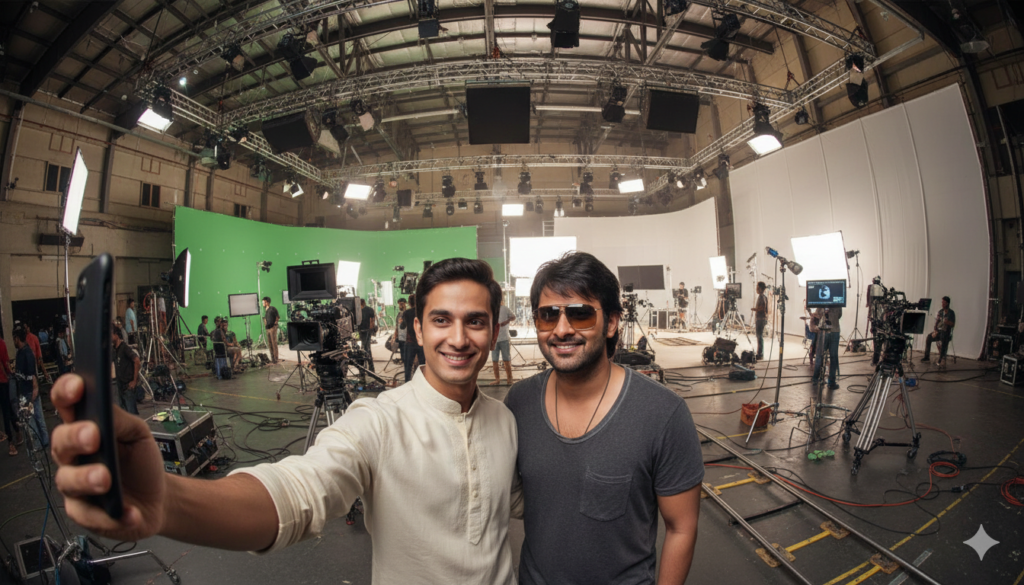
"Create an ultra-wide, cinematic selfie-style image in vertical 9:16 format.
IMPORTANT: Use the uploaded reference images exactly as they are. Do not change outfits, facial features, hairstyle, body type, or appearance in any way.
Uploaded Image 1: This is me (myself).
The character must look exactly identical to the uploaded image same face, same outfit, same hairstyle, no alterations.
I am holding the camera with my hand, taking a hand-held selfie.

Uploaded Image 2: The second uploaded character.
This character must also appear exactly as shown in the uploaded image, wearing the same outfit and look, with no costume or design changes.
Both characters are standing close together, naturally posing for a behind-the-scenes selfie.
The background is a large, wide, professional movie or series shooting studio, set during a daytime filming schedule.
The environment should clearly show a real film production day setup, including: professional cinema cameras mounted on tripods
camera rails / dolly tracks on the floor large studio lighting rigs, softboxes, LED panels
green screens, cables, monitors, reflectors crew members visible as silhouettes or blurred in the background
The studio should feel spacious, open, and big, like a high-budget movie set.
Lighting must be realistic studio daylight lighting, naturally illuminating both characters' faces and outfits.
The selfie should feel casual, candid, and behind-the-scenes, shot with a wide-angle smartphone lens, with slight edge distortion like a real selfie.
Ultra-realistic, high detail, sharp focus, cinematic color grading, professional movie set atmosphere."
Video Prompt:
selfie-style video, The camera stays in the same selfie position throughout, The person remains the same and walks to another scene smoothly, It should feel like one continuous shot where the person walks forward into a new location and ends by taking a selfie in the final scene. no talking, no lip movement, mouth closed
How To Create Video?
Now, when it comes to creating the video, it ’ s incredibly easy. I ’ ll show you how. Usually, you ’ ve already created the photos. To create the picture, you demand to go to the Google Flow website, the link for which I ’ ve provided directly here. You can access it by clicking the button. Once you ’ re there, first, you need to sign up and then go to the “ New Project ” option. After that, instead of “ Text to Video, ” you demand to select “ Frame to Video. ” Then you ’ ll find two options to upload photos. There will be two plus signs below. Look, you demand to upload the two photos you generated of the celebrity to both of them. Generally, then you ’ ll be given a picture prompting. No doubt, you want to paste that prompt, and then click “ produce, ” and in just a few seconds, your video will be ready. You can generate many such videos here, and it ’ s completely free.